
It's a Tuesday. You check your bank balance: $8,247. You feel okay about it. Maybe you book a flight.
Three weeks later, your GST/HST quarter closes. CRA wants $1,840. The “side project” you finished in March turns out to have been your worst-margin job of the year. The flight already cleared.
This is the most expensive habit Canadian freelancers and sole proprietors share: running the business off the bank balance. The bank shows you a number, but it's not yours yet. Some of it belongs to CRA. Some of it is from a project that lost money you haven't noticed. Some of it is a 90-day-old invoice you forgot to follow up on.
NorthOS is built around four numbers that tell you the truth instead.
What is Safe-to-Spend?
Safe-to-Spend is your bank balance minus the money that isn't really yours yet: income tax owed (estimated with 2026 federal and provincial tax brackets for your province), GST/HST collected, provincial sales tax collected (BC, SK, MB), and a 5% emergency buffer. It's the dollar amount a Canadian sole proprietor or freelancer can actually spend without coming up short at tax time.
1. What each project actually earned
Most accounting tools track categories. Most invoicing tools track invoices. Neither answers the question that matters when you're sitting across from a client deciding whether to take their next job: did the last one make me any money?
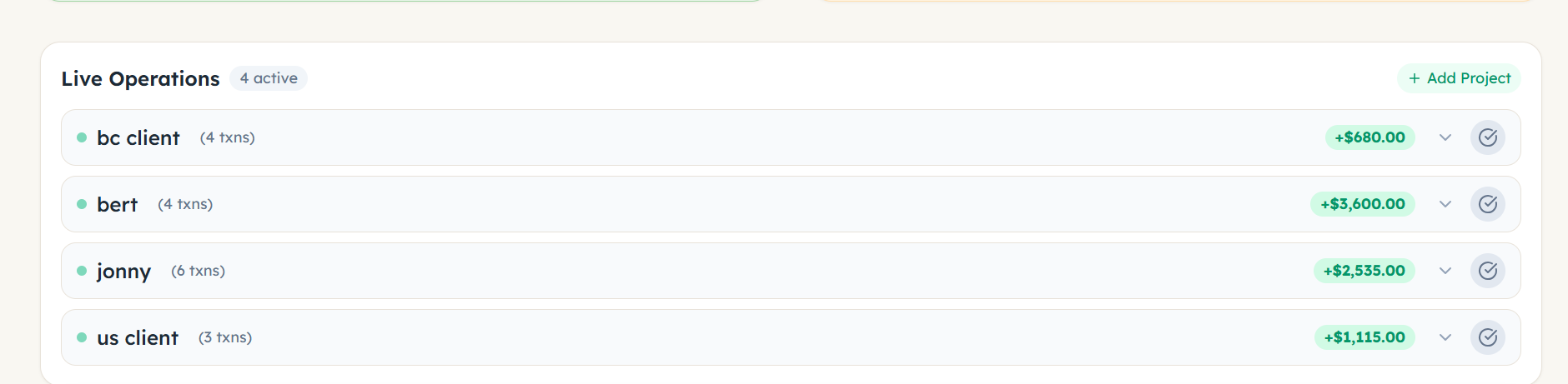
NorthOS' project tracker pins every income and expense to the project it belongs to. The website you built for the bakery, the consulting hours for the dental clinic, the recurring retainer with the marketing agency — each one has its own running gross and its own running net. When a project's margin is quietly dropping, you see it before you sign the next contract for the same rate.
2. Who has paid, who owes, and how late they are
The invoice tracker is the simplest possible answer to “where am I on getting paid.”
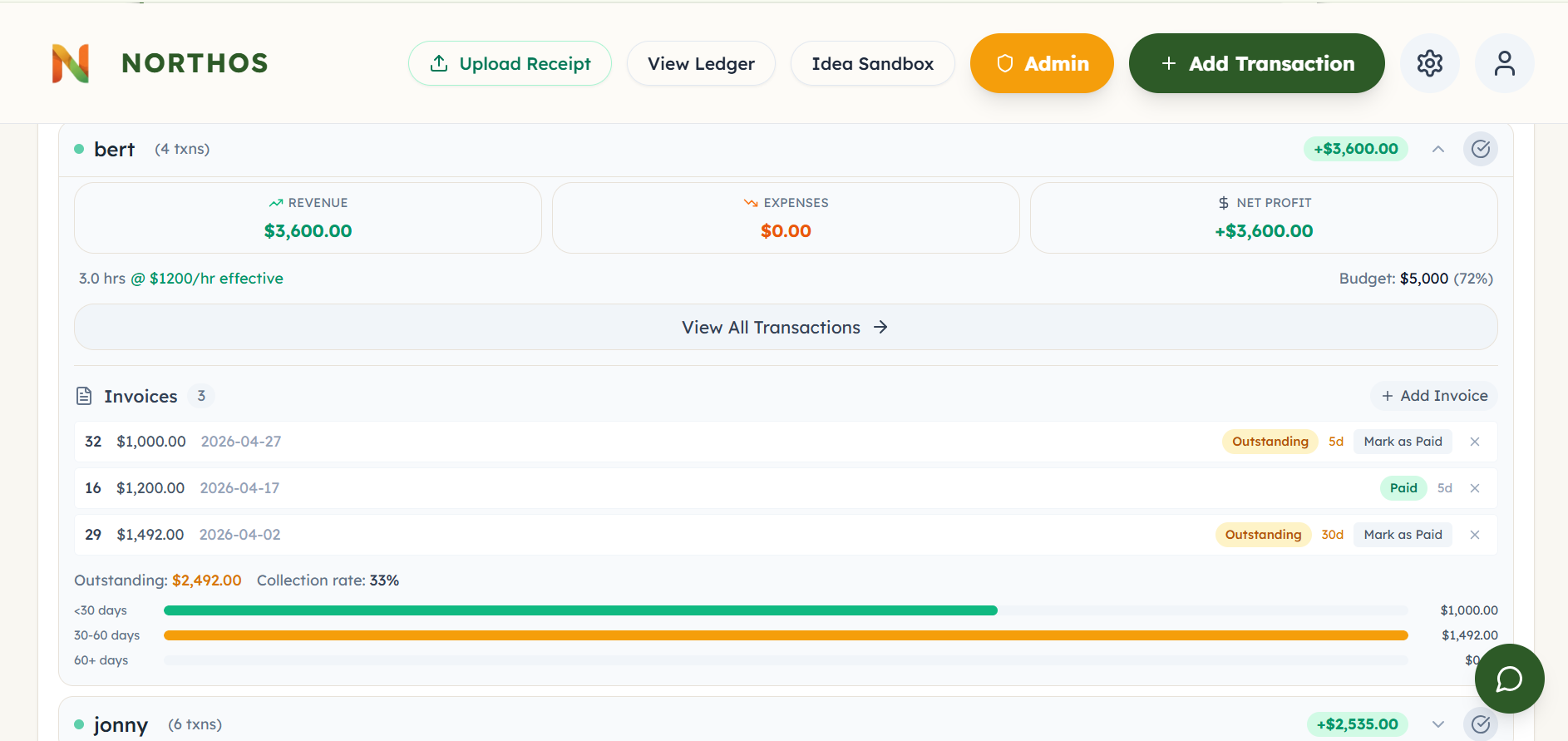
When you send an invoice, you log it in NorthOS: invoice number, amount, date sent, which project it's for. It enters the system as outstanding. When the money lands, you mark it paid — date sent and date paid are now both on the record.
From those two dates, NorthOS tells you what you actually want to know. Outstanding invoices break out into three age buckets — under 30 days, 30 to 60, and over 60 — with the dollar total in each one. A 90-day-old invoice doesn't quietly hide in a list anymore; it shows up under “over 60” with the amount still owed. You also see a collection-rate percentage per project, and clients who consistently take more than 30 days to pay get tagged with a “slow payer” flag the next time you start a job for them.
It isn't here to replace your invoicing tool. It's here to give you one screen that answers “have they paid me, and how late are they?” for every project at once, without you having to remember.
3. Gross vs. net — where CRA actually fits in
Gross is what the world paid you. Net is what's left after the costs of earning it. The difference between those two is the single biggest source of “wait, where did my money go?” feelings in self-employment.
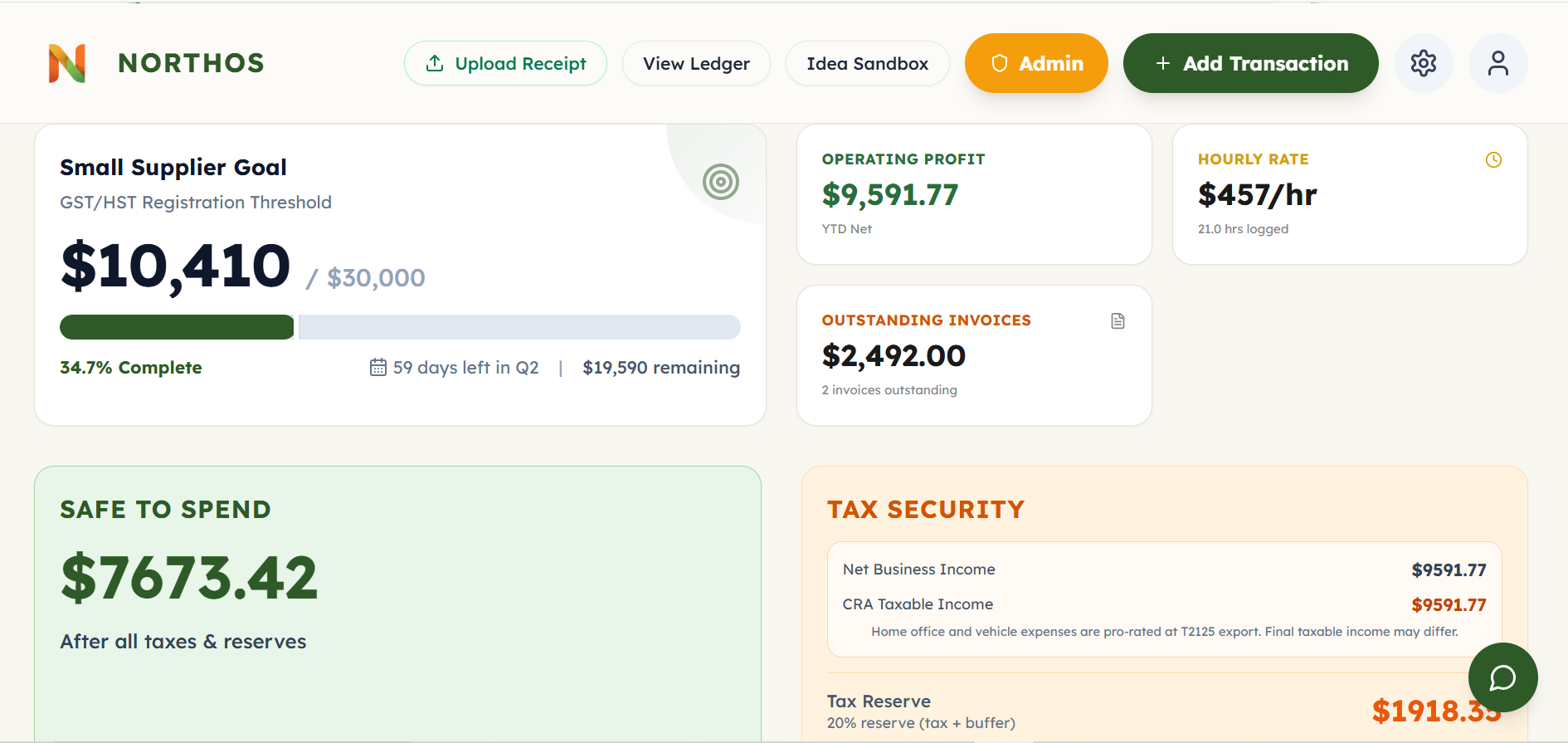
NorthOS' dashboard shows both, side by side, all year. Every expense you log lowers your net. Every kilometre you drive for work lowers your net. The portion of your home you use as a workspace lowers your net. So does the GST/HST you've collected but haven't remitted yet — because that money was never yours to spend.
When tax season comes, the same numbers are already arranged the way the T2125 wants them. Your accountant can open the export and see exactly where every line came from.
4. Safe-to-Spend — the final answer
This is the one most people only see in our app.
Safe-to-Spend is your bank balance, minus the money that isn't really yours yet:
- The income tax you'll owe on what you've earned so far this year (NorthOS estimates this with 2026 federal and provincial tax brackets for your province, including the basic personal amount, instead of a flat percentage)
- The GST/HST you've collected and will remit at the end of the quarter
- Provincial sales tax you've collected if you're in BC, SK, or MB
- A 5% emergency buffer on top
When a $4,000 invoice gets marked paid and your bank shows $12,000, NorthOS doesn't congratulate you. It tells you exactly how much of it belongs to CRA and how much you can spend without getting in trouble next April. It updates the moment you log income or an expense.
It is the number every freelancer wishes they had grown up with.
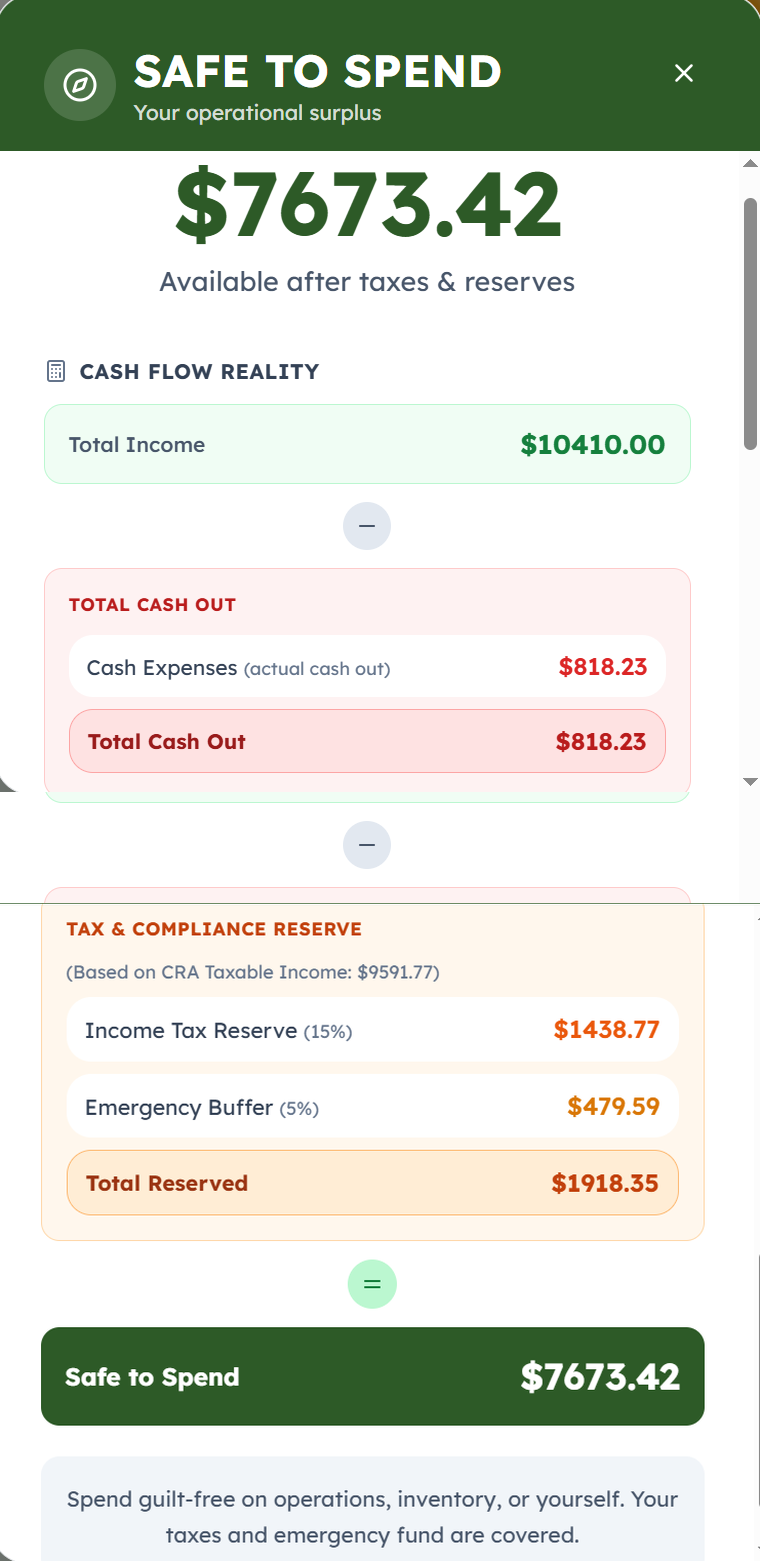
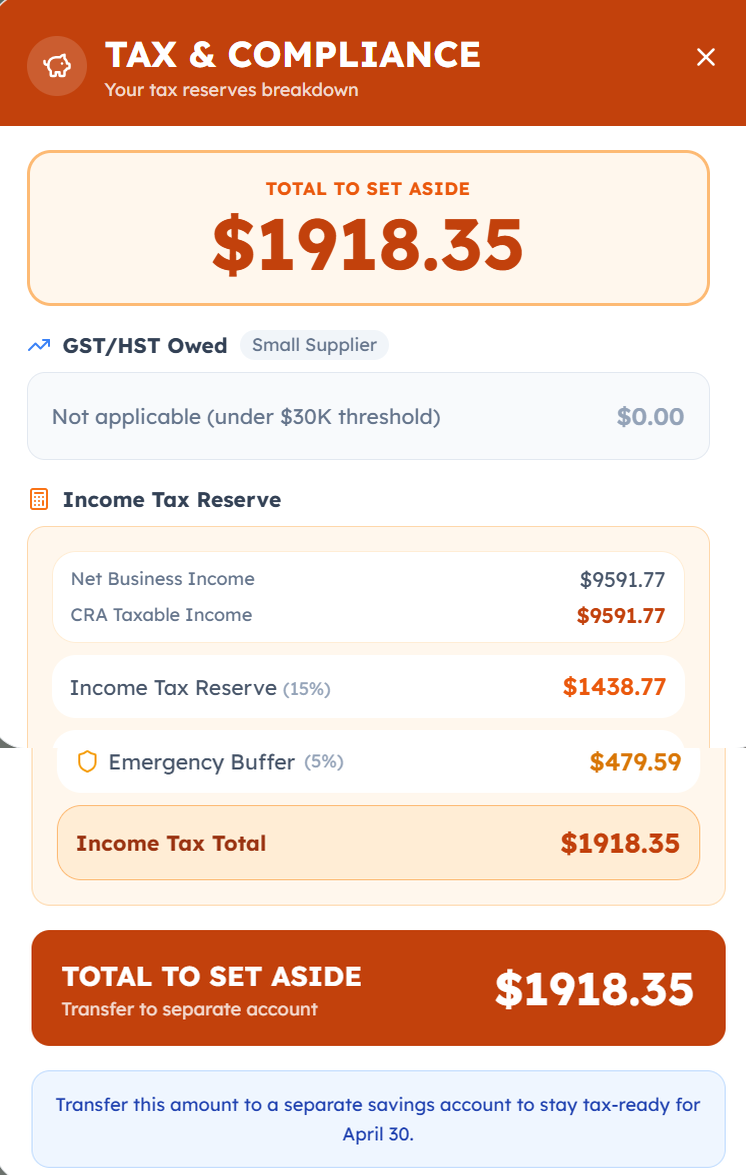
When you want the operational version of that number — what do I literally move out of my chequing account this week?— there's a Tax Security tile that opens a separate Tax & Compliance view. Same math, different framing: it tells you the exact dollar amount to transfer to a separate savings account so the money is gone before you can spend it. April 30 stops being a surprise.
Heads up
Self-employed CPP contributions aren't subtracted from Safe-to-Spend yet — that's coming. Until it ships, set aside an extra ~10% of your net income manually if you want a true number. As a sole proprietor you owe both the employee and employer half (11.9% combined in 2026, up to ~$8,461. See the full set-aside guide for the math).
Why one screen instead of four tools
Most of the people who land on NorthOS got here after trying to glue together a Notion board, a separate invoicing tool, a spreadsheet for receipts, and a rough mental tax estimate. The system works for about three months. Then a project slips, an invoice ages out, a quarterly GST bill catches them off guard, and the spreadsheet stops getting updated.
NorthOS keeps the four numbers in one place because they only mean something together. Gross without net is a brag. Net without invoices is a guess. Invoices without Safe-to-Spend is the same trap as the bank balance.
If you're a Canadian sole proprietor or freelancer who's been doing this in your head, the four numbers above will be on your dashboard before you log your first transaction.
Frequently asked questions
What is Safe-to-Spend?
Safe-to-Spend is your bank balance minus the money that isn't yours yet: income tax owed (estimated with 2026 federal and provincial tax brackets for your province), GST/HST collected, provincial sales tax (BC, SK, MB), and a 5% emergency buffer. NorthOS calculates it from your logged income and expenses and updates it the moment you record a new transaction.
How does NorthOS calculate Safe-to-Spend?
Safe-to-Spend equals Total Income minus Total Cash Out minus Tax & Compliance Reserve. Total Cash Out is your logged business expenses plus any capital asset purchases. Tax & Compliance Reserve is GST/HST collected, provincial sales tax (BC, SK, MB), a bracket-aware estimate of federal and provincial income tax based on your province's 2026 rates, and a 5% emergency buffer on top.
Why is Safe-to-Spend lower than my bank balance?
Your bank balance includes money that doesn't belong to you. Some of it is GST/HST you collected and owe back to CRA. Some is income tax you'll pay in April. Some is provincial sales tax collected on behalf of BC, SK, or MB. Safe-to-Spend subtracts those amounts so the number you see is what you can actually spend without coming up short at tax time.
Does Safe-to-Spend include CPP for self-employed Canadians?
Not yet. As of 2026, Safe-to-Spend reserves a bracket-aware estimate of federal and provincial income tax (using your province's 2026 brackets and basic personal amount) plus a 5% emergency buffer, but does not separately reserve for self-employed CPP. Sole proprietors pay both employee and employer portions of CPP, about 11.9% combined in 2026, capped near $8,461. Until CPP is added to Safe-to-Spend, set aside an extra ~10% of net income manually for a fully accurate number.
How is Safe-to-Spend different from net income?
Net income is an accounting concept — revenue minus expenses, used for filing your T2125 and calculating taxes. Safe-to-Spend is a cash-flow concept — what's actually in your bank account after subtracting the money you'll owe. Two freelancers with the same net income can have very different Safe-to-Spend numbers depending on whether they've already paid expenses, whether they've collected GST, and whether they've set instalments aside.
Should I trust Safe-to-Spend, or check with my accountant?
Safe-to-Spend is a conservative day-to-day estimate, not a tax filing. It's designed to keep you from spending money that should be reserved for CRA. Your accountant calculates exact taxes owed at year-end using your full T2125, all your deductions, and your specific provincial rates. Use Safe-to-Spend as a daily-decision tool and your accountant as the year-end source of truth.
See your own four numbers
Onboarding takes about four minutes. North will walk you through setting up your profile, and your project list, invoice tracker, gross-vs-net dashboard, and Safe-to-Spend will be live before you log your first transaction.
Get Started →Related reading
- How Much to Set Aside for Taxes as a Canadian Freelancer — the math behind the 25–30% rule, by income level.
- How to Fill Out Form T2125 — Step by Step — the CRA form your Safe-to-Spend numbers feed into at tax time.
- Is QuickBooks Self-Employed Discontinued in Canada?: no, it is still sold. An honest price and CRA-depth comparison with NorthOS.
- Why Canadian Side Hustlers Avoid Their Taxes — the psychology behind tax avoidance, and how clarity dissolves it.
This article is for informational purposes only and does not constitute tax advice. CRA rules and rates can change — always verify with the CRA or a qualified tax professional.